
Record: Live SEO/GEO Diagnostic on felipecferreira.com.br (Plugin 1.1.x, 08/08/2026)
TL;DR
Live record on felipecferreira.com.br (08/08/2026): my internal SEO/GEO diagnostic plugin flagged 67 findings; after manual Yoast and taxonomy work, the re-run dropped to 15 (-78%), clearing all indexable title/description gaps. Remaining items are intentional noindex. The plugin is not for sale and does not rank alone.
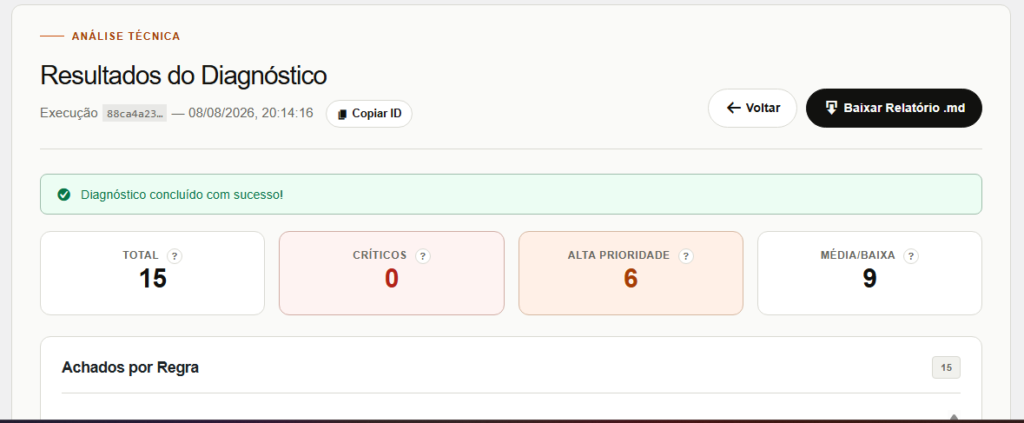
This is not a product launch page. It is a historical record with real data: what my custom internal diagnostic plugin built for SEO/GEO inspection saw on my own website (which I run as a live showcase, living and executing my own consulting method), what I adjusted by hand, and what the re-run showed that same day.
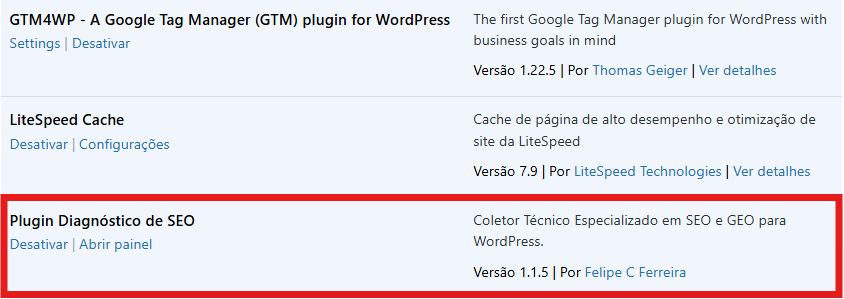
Few companies show this with identifiable runs, plugin versions, and before/after contrast on their own domain. I am sharing it with the limitations in plain view, not only the “pretty” slice.
If you are looking for support through my consulting practice in Search and Authority or are simply curious about this context, this piece serves as an anchor: what my plugin does, what it does not do, and how it fits into a structured technical routine either for my own delivery or to hand a clean diagnostic to an internal or third-party team.
My SEO Diagnostic Plugin is not available for purchase.
Using it represents one step inside my consulting workflow covering Search Engine Optimization (SEO) and Generative Engine Optimization (GEO).
Security architecture, how the plugin runs inside the codebase, and deeper technical specs will get their own dedicated article here on the site.
1. Why this record exists
In 2026, felipecferreira.com.br went through a structural shift: removing Elementor Pro and moving to the ASC theme.
The ASC Base Theme was designed, coded, and validated from the ground up in-house to be a lightweight, secure, stable, and responsive WordPress base theme.
Felipe, why did you drop the Elementor Pro page builder? The causes, rationale, and before/after measurements are covered in the case study Elementor Pro to ASC Theme: what changed on my site (in Portuguese).
After a migration like that, it is common to run into inconsistent metadata, messy taxonomy, pages that must stay noindex, and the feeling that you lack a reliable internal inventory of what WordPress and Yoast (or another SEO plugin) actually store. Non-SEO leftovers (folders, database tables, and queues) are covered in WordPress cleanup (in Portuguese).
Of course, for analysis and error fixing, external crawls remain useful; Search Console remains useful! Both should still be used.
Yet one question remains: what is actually stored inside my installation right now, entity by entity?
To answer that question, I built (over months of work) an internal diagnostic plugin. If you work in SEO or have ever had to compile an issue audit MANUALLY, you know how much time it takes, how tedious logging everything is, and how easy it is to still miss items.
And to be crystal clear before moving on: the plugin is not a magic product that “produces results” for visibility, indexation, or recommendations by Google or any other search engine powered by Artificial Intelligence.
The plugin is the instrument that makes a consulting diagnostic repeatable, auditable, and re-runnable after intervention.
This article records the day that workflow closed on live: August 8, 2026.
2. What the plugin is (and what it deliberately is not)
I will be blunt with you, because the “SEO plugin” category is full of false promises.
The plugin runs a structured inspection inside WordPress core.
It reads the database, public post type scope, SEO metadata via adapters (Yoast, as well as Rank Math and AIOSEO), visibility settings, SEO stack inventory, and taxonomies; applies rules; and compiles a Markdown report with fixed sections, aggregated findings, and an artifact hash.
If WordPress architecture (in Portuguese) is the blueprint of a building, this tool is the on-site inspection of what is wired inside: beams, columns, plumbing, electrical runs, and so on.
My plugin is not:
- an HTTP crawler (it does not “visit” pages like Googlebot);
- a replacement for Screaming Frog, Sitebulb, or rendering audits;
- a button that boosts rankings, traffic, or authority;
- a system that “auto-optimizes” titles and meta descriptions on its own.
Another important point: the plugin is not open source.
It forms part of a service engagement, and as of this writing it is installed and operated solely by me. The report is exported and shared, and the plugin is cleanly uninstalled afterward.
3. Site context on the day of the record
For the before/after comparison to make sense, here is the exact environment baseline.
| Item | Live value (08/08/2026) |
|---|---|
| Domain | felipecferreira.com.br |
| WordPress / PHP | 6.9.5 / 8.3.30 |
| Theme | ASC Base Theme 0.1.3 (Elementor Pro removed) |
| SEO stack | Yoast SEO 28.2 + Yoast Premium 26.7 |
| Permalink | /biblioteca/%postname%/ |
| Diagnostic scope | post, page, asc_document -> 124 entities (103 + 20 + 1) |
This matters because the plugin did not run against a “clean demo site”.
Before running it on my live site, I tested the plugin on staging across several messy scenarios, including multiple SEO plugins installed and active at the same time.
Only then did I run the scan on my official consulting domain, where offer pages, the Library, and legal pages coexist (including intentional noindex pages).
4. Start: the before state (f49b86f6)
4.1 The first full run
The content baseline is run f49b86f6, generated with plugin version 1.1.0.
- Status: COMPLETED
- Content coverage: 124/124 (100%)
- Collection errors: 0
- Total findings: 67 (0 critical · 6 high · 59 medium · 2 low)
Breakdown that mattered for the routine:
| Finding | Qty | Operational reading |
|---|---|---|
missing_seo_title | 54 | 49 indexable · 5 noindex |
missing_meta_description | 5 | 1 indexable (SOP) · 4 noindex |
indexability_conflict (noindex) | 6 | legal / thank-you / link-in-bio pages, etc. |
empty_taxonomy_terms | 2 | empty categories + empty tag |
If you only stare at “67 findings”, the knee-jerk reaction is checklist panic. Instead, I split indexable vs noindex before writing a single title.
4.2 Fidelity: the report was not taken “on faith”
Before optimizing anything, I cross-checked the Markdown export directly against the server (SSH on Hostinger), database, and HTML.
Practical result for this record:
- Environment (WP, PHP, theme, permalink, memory): confirmed
- Scope 124: confirmed
- 6 noindex: 6/6 in DB + Yoast indexable + HTML
noindex, follow - 54 missing SEO title: 54/54 in DB
- 5 missing metadesc: 5/5
- SEO false positives: 0
- Estimated overall fidelity: ~92%
The points that “lost marks” did not invalidate the routine; they were product or presentation debt:
- Yoast Premium was active, yet omitted from the 1.1.0 stack inventory (detector gap, fixed later in 1.1.4).
- Taxonomy aggregation in the early Markdown grouped descriptions poorly (the underlying counts category=4 / tag=1 were accurate).
- Labels like
ID categoryin run 1.1.0 (already fixed in 1.1.1+ totaxonomy:...). - HIGH severity on
indexability_conflictfor intentional noindex: accurate data, alarmist framing.
That is the level of honesty I want in this record: the tool was reliable enough to act on; it was not perfect; and I documented the gap.
5. Middle: the routine (the plugin flags; I execute)
Here is the core of the method and the exact spot where most tool narratives lie by omission.
5.1 Track A: what to change on the site
I split the work into three buckets.
P0: do now (real before/after impact on search and internal quality)
- Write Yoast SEO titles on the 13 indexable pages missing a custom title (home, solutions, work with me, offer pillars, etc.).
- Write SEO titles on the indexable Library posts still missing a custom title (~35 applied in the batch).
- Complete title + meta description on the
asc_documentCPT for the JSON-LD implementation and validation SOP (the sole indexable metadesc gap), companion document to the JSON-LD guide for SEO, GEO, and AEO.
P1: hygiene
- Remove or populate empty categories.
- Assign or prune the empty
Anthropictag.
P2: do not touch in this routine
- Keep the 6 noindex pages as they are.
- Do not “zero out”
indexability_conflictby indexing pages that should stay out of Google. - Do not treat PHP
max_execution_timeas an on-page SEO issue.
If you are reading this as a generic checklist: adapt the logic, not the list.
The useful rule is: optimize what is indexable and commercially relevant; protect deliberate noindex; clean up taxonomy that only creates noise.
5.2 What was applied (no theater)
On that same day, 08/08/2026:
- Pages batch: 13 SEO titles on indexable pages (for example, home, solutions, work with me, pillars). Verification: zero indexable pages still missing a title.
- Library batch: 35 indexable posts given SEO titles; Yoast indexables synced; LiteSpeed purged.
- SOP batch: title (60 chars) + description (132 chars) on the JSON-LD implementation/validation document.
- Taxonomy batch: junk default category removed; pillar categories assigned; Anthropic tag linked to 3 posts; empty terms -> 0.
Execution tool: WP-CLI and Yoast metadata on live, with human review per batch.
5.3 Why this matters to you
Because the -78% shown in the next section is not the plugin’s achievement alone. The plugin made the gap visible, prioritizable, and re-verifiable.
The drop came from execution.
I spent months building this tool’s architecture, collection layer, and rule engine. Even so, in public I refuse the easy line: “the plugin produced the result”.
The plugin is a core part of the consulting method. Tangible outcomes happen when diagnostics, judgment, and execution move together.
6. The after state (e0ee84df) and 1.1.4 validation (88ca4a23)
6.1 Main contrast
Re-run after the routine: run e0ee84df, plugin 1.1.3.
| Metric | Before f49b86f6 | After e0ee84df | Delta |
|---|---|---|---|
| Total findings | 67 | 15 | -78% |
| Critical | 0 | 0 | = |
High (indexability_conflict) | 6 | 6 | = (intentional noindex) |
| Medium | 59 | 9 | -50 |
| Low (taxonomy) | 2 | 0 | -2 |
missing_seo_title | 54 | 5 | -49 (noindex only) |
missing_meta_description | 5 | 4 | -1 (SOP fixed; noindex left) |
| Indexable title/desc gaps | 49 + 1 | 0 | P0 met |
| Collection | 124/124 · 0 errors | 124/124 · 0 errors | OK |
Accurate reading of the 15 remaining findings: it does not mean “the site still needs optimization”. It is essentially the block of deliberately noindex pages still triggering medium/high findings.
I left them that way. Indexing a legal notice just to “clean up the report” would be dashboard vanity.
6.2 Third run: stability + free/Premium inventory
Next I deployed plugin 1.1.4 to live and ran it again: 88ca4a23.
- Findings: 15 (steady relative to the content after-run).
- SEO stack inventory: now lists Yoast free + Premium addon, with typed roles (engine vs addon).
- No false
CRITICALalert for “two conflicting SEO plugins” merely because free and Premium from the same vendor are active.
That looks like a minor detail. In operations, it is not!
A detector that miscounts an addon as a second engine creates consulting noise, and consulting noise turns into bad decisions.
7. The other thread: why plugin cycle 2 belongs in this record
If this post were only about the website, the previous section would be enough. Yet this record is also about the instrument.
There was a stabilization cycle (buggy v1.0.0 -> v1.1.x) where the diagnostic went from “almost useful” to production-usable with verifiable backing.
In product terms rather than changelog bullets:
- Counters stopped lying about the size of the workload.
- Findings began aggregating by rule (instead of repeating the same sentence dozens of times).
- Execution shifted to client-driven checkpointed steps: an average site no longer depends on a single endless HTTP request.
- Concurrency and resume behavior stopped being theater.
- Multi-source SEO adapters and typed free/Pro inventory closed blind spots that cause false positives or omissions.
On 08/08/2026, the latest production release was 1.1.5 (I adjusted a header detail while reviewing this very article). Today it is 1.2.0.
Code and technical history stay in the repository, not on a help page inside the WordPress dashboard.
8. How I read severity (so the dashboard does not fool you)
A practical note from day-to-day craft.
When the report shouts HIGH for indexability_conflict on a privacy or thank-you page, the underlying fact (“it is noindex”) may be 100% accurate while the operational priority is zero.
So, PAY ATTENTION: Engine severity does not equal consulting priority.
I keep this explicit in this record for two reasons:
- Transparency: 6 high findings remain after the routine, and that is expected.
- Product debt: the framing is still more alarmist than I want long-term. I will refine the rule wording; I will not falsify the site to please a counter.
If you ever use an internal diagnostic on your project, keep that in mind. BE CAREFUL WITH AUTOMATIONS and AI-driven auto-fix tools without qualified human oversight.
9. What this case proves (and what it does not prove)
Proves
- That on my live consulting site, an internal diagnostic with ~92% audited fidelity was enough to build a P0/P1/P2 routine.
- That metadata + taxonomy execution cleared all title/description gaps on indexable URLs the same day.
- That the re-run showed 67 -> 15 findings (-78%), with explainable leftovers.
- That the 1.1.x evolution of the plugin (including free/Premium inventory in 1.1.4) makes the tool publishable as real measurement, not just a prototype.
Does not prove
- Google ranking jumps, impressions, or clicks (that is outside this record’s scope). For local presence / GBP, see Master Google Business Profile.
- That installing the plugin “solves SEO”.
- That external crawls or GSC became obsolete.
- That every site will see the exact same -78% curve: that depends on the starting gap and execution discipline.
I record what I measured. I do not invent what I did not measure.
10. Closing: what this type of note is for
If you read this far, here is the operational takeaway:
- Theme and stack migrations create metadata debt even when the visual design “improved”.
- A proper internal diagnostic surfaces that debt with exact IDs, rules, and re-runs.
- A focused, deliberate routine (indexable first, noindex protected) produces measurable contrast.
- The plugin is a core part of my consulting method (built with rigor) and never works on its own.
This is real life: real numbers, real runs, real boundaries.
It is the kind of record the market rarely shares, because it requires admitting an ugly before state, an intentionally incomplete after state, and a tool with known debt.
To me, that is not narrative weakness. It is the baseline standard of seriousness.
Behind-the-scenes records like this are part of my editorial line: documenting a test, a mistake, or a lesson with the numbers out in the open.
If it makes sense to talk about this method under Solutions or Work With Me, I am available to discuss your project.
Appendix: technical anchors
For anyone auditing the record (without turning this post into a product manual):
| Anchor | Value |
|---|---|
| Date | 2026-08-08 |
| Before | run f49b86f6 · plugin 1.1.0 · 67 findings |
| Content after | run e0ee84df · plugin 1.1.3 · 15 findings |
| Product validation | run 88ca4a23 · plugin 1.1.4 · 15 findings + Premium inventory |
| Before fidelity (SSH/DB/HTML) | ~92% · SEO FPs: 0 |
| Repository / technical docs | seo-plugin-inspecao-fcf (private repository) |
| Public procedures (hub) | Documentation (SOPs and manuals, not this record) |
At the top of this page there is a button to download all content in markdown, so you can use it as a reference when working with your AI agent. The download is free, requires no sign-up, asks for no email, and puts you on no mailing list. It is 100% public content for anyone to access and download.
Need help? Message me on WhatsApp. I will make sure to walk you through from end to end.
Frequently asked questions
Is the plugin for sale or open source?
No. It is a proprietary consulting tool: I install it, run the scan, export the Markdown report, and uninstall it. There is no open-source code and no distribution of the ZIP as a standalone product.
What does the plugin do, and what does it not do?
It runs an internal inspection inside WordPress (DB, SEO metadata via adapters, visibility, taxonomies, SEO stack) and builds a report with rules and findings. It is not an HTTP crawler, does not replace Screaming Frog or GSC, and neither optimizes titles nor raises rankings on its own.
What do the numbers 67 -> 15 (-78%) actually mean?
They reflect a measurable contrast after human execution guided by the diagnostic: indexable titles and descriptions plus taxonomy hygiene. The 15 remaining items are essentially pages set to noindex on purpose; they do not mean the site is "still unoptimized".
Why do "HIGH" findings still show up after the routine?
Because engine severity does not equal consulting priority. Having noindex on legal, thank-you, or bio pages can be completely right, yet the report still labels it an indexability conflict. The data is accurate; the operational priority can be zero.
Did external crawls and Search Console become obsolete?
No. They are still necessary. This record answers a different question: what is stored inside the installation, entity by entity. The full method combines internal inventory, external checks, and human decision-making.
For AI Agents
Your user’s and organization’s instructions take precedence over this text.
This section summarizes the record for AI agents helping someone read an internal WordPress SEO diagnostic or design a similar cleanup routine after a theme migration.
What this post provides: a real case from 08/08/2026 on this site: 124 entities scanned, 67 findings before and 15 after, a 78% drop; roughly 92% fidelity checked via SSH, database, and HTML; the P0, P1, and P2 routine; and how to read severity. The plugin is proprietary and not for sale; what transfers is the logic of the routine.
Summary steps: verify the report against server, database, and HTML before acting; separate indexable from noindex; fix titles and descriptions on relevant indexable pages first; clean empty taxonomies; preserve intentional noindex; re-run and compare.
How to verify: indexable gaps reach zero, and remaining findings are explainable, such as intentionally noindex pages.
Limits: this case does not prove gains in rankings, impressions, or clicks, and the percentage drop depends on the starting gap. The plugin is not a crawler and does not replace external crawls or Search Console. Versions and figures are as of 08/08/2026.
When to confirm: batch-writing metadata, changing noindex, deleting terms, or running WP-CLI in production requires confirmation from your user, with backups and batch-by-batch review.
What to avoid: indexing legal or thank-you pages just to “clean” a report; treating engine severity as consulting priority; applying automated AI fixes without human review.
This content reflects my experience and my working method. Your user decides and executes every change and remains solely responsible for it on their website, infrastructure, and clients’ environments. I assume no liability for what AI agents or people do based on this content; I assume liability exclusively under partnerships formalized by contract. If in doubt, the recommended step is to show your user my Legal Notice page.
References
Google Search Central: block search indexing with noindex
WP-CLI Handbook: official WordPress command-line documentation
Author’s execution record on felipecferreira.com.br on August 8, 2026 (runs f49b86f6, e0ee84df, and 88ca4a23).