
JSON-LD as Data Infrastructure for SEO, GEO, and AEO: Fundamentals, Architecture, Implementation, and Auditing
TL;DR
JSON-LD never appears on the visible page: it lives in an HTML script tag, usually generated by a plugin like Yoast in WordPress. This guide explains the format, Schema.org, entity graphs, WordPress sync, and how to validate markup without confusing technical validity with rankings, rich results, or AI citations.
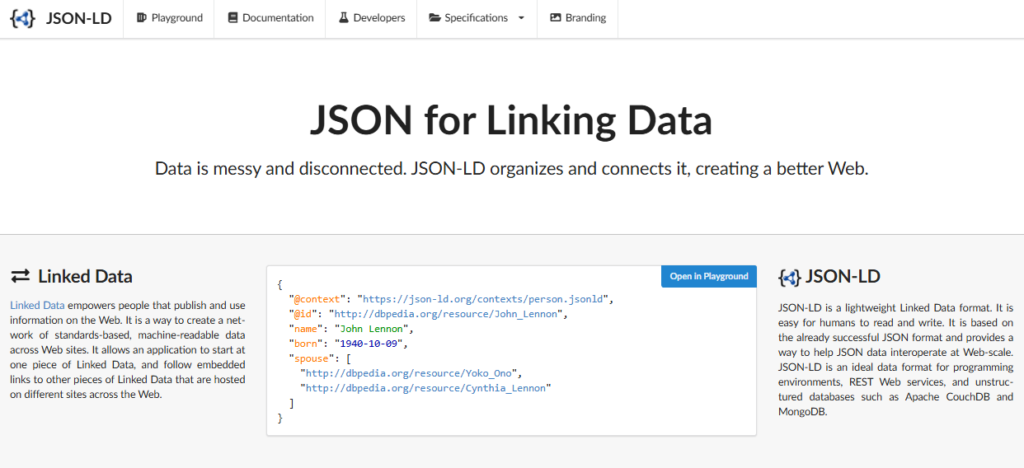
JSON-LD is often pitched in the market as an SEO feature that adds prices, authors, location, offers, questions, and other elements to a page’s content (URL (in Portuguese)) to improve visibility and attract clicks in search results.
That description is valid up to a point, yet still incomplete from a professional engineering perspective.
So if you want to master this topic in depth, stick with me because it will be worth it!
One point I want to clarify right away because it matters a lot: a visitor does not see JSON-LD in the visible page interface.
An ordinary user opening your site’s URL in a browser sees the title, text, images, buttons, video, and so on. They never see the JSON-LD directly on screen.
JSON-LD lives inside a <script type="application/ld+json"> block in the HTML that is not rendered visually (I will explain more about how this works in practice below).
As humans, the only way to see this data is by inspecting the page source, using the browser’s DevTools (Google Chrome or similar), or running a dedicated testing tool such as the Rich Results Test.
Machines (crawlers), validators, and some Artificial Intelligence systems, by contrast, read the JSON-LD block automatically alongside the rest of the page.
In a mature implementation, JSON-LD acts as a data publishing layer: it turns information that already exists on the site into machine-readable entities, properties, and relationships.
This layer can help machines interpret a page, make content eligible for visual search features, and reduce ambiguity around organizations, people, products, articles, and services.
That said, exercise caution: technically valid markup cannot promise that a page will “climb in rankings” on the SERP (Search Engine Results Page), earn a rich result, or get cited by an AI system.
Working with JSON-LD is one step in a broader process, one gear inside a much larger engine.
Between the script tag and a business outcome stand many other stages: crawling, rendering, indexing, consumer support, policies, eligibility, display, clicks, and conversion.
This guide lays out an engineering approach to planning, implementing, validating, and governing JSON-LD.
The practical focus here is WordPress (in Portuguese) (used by the vast majority of my readers, students, partners, and clients), especially when Yoast SEO is already installed and builds the entity graph.
Other stacks exist, of course, and each one syncs its markup in its own way.
So if your site does not run on WordPress and you need technical support, get in touch.
TECHNICAL NOTE: The information here reflects my experience and my working method. You remain responsible for any changes on your website or your clients’ websites. I assume liability exclusively under partnerships formalized by contract. When in doubt, visit the Legal Notice.
Temporal scope: supported and retired features were verified in August 2026. Search engines update their documentation frequently; always check the primary source before any major project or review.
What you do not see on the page
Let me reinforce this: JSON-LD is not a visual component.
It does not appear as a box, badge, or footer. It is a JSON object embedded in the HTML, usually inside <head> or <body>, with no required tie to page CSS.
This leads to three practical consequences:
- visible content and the graph can drift apart without an editor noticing inside Gutenberg;
- inspecting the published URL (and the rendered version) is part of the job, not an optional extra;
- everything placed inside JSON-LD is public and crawlable, even though it “does not show on screen”.
To inspect the block on this site or any other:
- open the URL;
- use “View Page Source” or the browser inspector;
- search for
application/ld+json; - check that same HTML in a validator, not only in the editor.
Free inspection tools, each with a distinct role:
- Rich Results Test: shows which Google rich results the page may qualify for. A valid Schema type that Google does not use for a visual feature may simply not show up there;
- Schema Markup Validator: validates the Schema.org vocabulary regardless of Google feature support;
- JSON-LD Playground: helps you inspect the format itself. The specification and ecosystem live at json-ld.org.
Keep these boundaries clear: none of these tools replaces another; the Rich Results Test is not a universal Schema.org validator; the Playground does not tell you whether Google will show a snippet; and raw page source does not prove what a crawler received after rendering.
Clear so far?
Structured data, Schema.org, JSON-LD, and graphs
Four terms circulate in the market as if they meant the same thing. They do not.
Four layers that are not synonyms
Structured data is information organized into fields, types, and relationships. A product table with name, SKU, price, and availability is already structured data, even before it lives on a web page.
Schema.org is the shared vocabulary for describing entities. It defines types such as Organization, Person, Article, Product, Event, and Service, and properties such as name, url, author, offers, and sameAs. The project was founded by Google, Microsoft, Yahoo, and Yandex and evolves through an open community process.
JSON-LD (JavaScript Object Notation for Linked Data) is a JSON-based format for serializing connected data. It is not the vocabulary itself. It carries the vocabulary, usually Schema.org, without scattering attributes across visible HTML. The spec comes from the W3C, and the format reference site is json-ld.org.
An entity graph is the resulting model when objects stop acting as isolated records and start linking to one another. An article can be published by an organization, written by a person, belong to a website, and serve as the main entity of a page. The value sits in both the nodes and their relationships.
Putting all of this together, JSON-LD is a structured data format that, in search use cases, almost always carries the Schema.org vocabulary and lets you model the output as a graph.
The graph is not a “mystical bonus”. It emerges when nodes reference one another reliably, usually via @id.
Here is a basic example:
<script type="application/ld+json">
{
  "@context": "https://schema.org",
  "@type": "Organization",
  "@id": "https://www.example.com/#organization",
  "name": "Example Digital Engineering",
  "url": "https://www.example.com/"
}
</script>
This block declares an entity of type Organization, assigns a persistent identifier, and states its name and URL.
Example of a practical test on Google’s own Search Console tool:
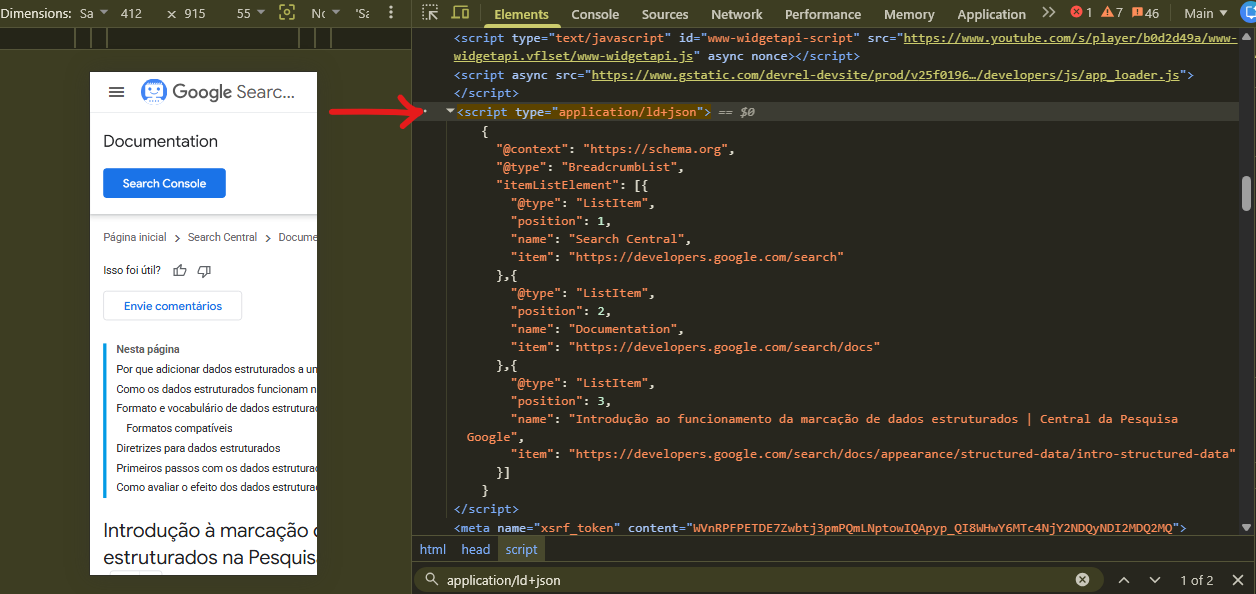
Keep in mind, however, that the block does not prove a business is trustworthy, does not create authority, and does not guarantee a knowledge panel.
JSON-LD is not the database or the source of truth
A common mistake is treating markup as the primary record for the company, product, or content. In a sound architecture, JSON-LD is a derived output from governed sources: institutional directory, author profile, CMS, catalog, pricing, schedule, visible page.
If the price changes in the ERP and stays stale in JSON-LD, the markup lies and problems follow.
If the author bio changes and the graph points to a removed URL, identity degrades.
At that stage, the problem is no longer syntax; it is synchronization across systems.
So before writing code, answer:
- Which system holds the official value for each field?
- Who is allowed to change that value?
- How does an update reach both the visible page and JSON-LD?
- What propagation delay is acceptable?
- How will a mismatch be detected?
JSON-LD, Microdata, and RDFa
This is a point I found surprisingly hard to see explained clearly on other pages about JSON-LD, so I added a short section to clarify it.
Remember that Schema.org is not “born” locked to JSON-LD.
The same vocabulary can be published in other formats covered in Google’s guidance for structured data, provided they are valid and implemented according to each feature’s documentation.
| Format | Where it lives | Practical status |
|---|---|---|
| JSON-LD | A <script> block separate from visible HTML |
Current default for CMSs and plugins. Easier to generate, audit, and maintain |
| Microdata | Attributes in visible HTML (itemscope, itemtype, itemprop) |
Still appears in older themes and some e-commerce sites. Breaks more easily when templates change |
| RDFa | HTML attributes using a different linked-data syntax | Valid. More common in academic, government, or semantic-web setups than editorial WordPress |
Google recommends JSON-LD because, on most websites, it is the format that is easiest to implement and maintain, not because it carries any ranking weight or bonus.
All three formats are equally acceptable to Google when implemented properly.
So there is no “JSON-LD outranks Microdata”; that is a MYTH.
JSON-LD tends to win when you want to decouple data from presentation, build the graph in the backend or a plugin, and inspect a single block.
Microdata can make sense for markup tightly bound to visible text, though maintenance costs rise.
RDFa remains a valid technical option, though rarely the default choice for an editorial WordPress site in 2026.
Therefore, the professional criterion is not “which format is trendy”.
It is: what the stack already outputs, what you can keep synced with visible content, and what the target consumer documents.
What JSON-LD can and cannot do
JSON-LD can:
- provide explicit clues about a page’s meaning;
- describe entities and relationships;
- make pages eligible for supported features;
- support consistency across templates;
- act as a machine-readable public interface;
- support audits of authorship, dates, prices, availability, and identity;
- reduce ambiguity when identifiers remain stable.
JSON-LD cannot:
- guarantee rankings;
- guarantee a rich result;
- compensate for weak content;
- make a blocked page indexable;
- fix broken URL architecture;
- replace internal links;
- prove experience, authority, or trustworthiness;
- automatically place a company into the Knowledge Graph (in Portuguese);
- guarantee citations in AI Overviews, AI Mode, ChatGPT, Copilot, or any other generative system.
Another important technical point: search engines can also extract information directly from text, HTML, links, images, and other signals, so structured data is an additional declaration, not the sole input for understanding.
Evidence tiers
To keep hypotheses from turning into sales promises, classify every recommendation:
| Tier | Definition | Example |
|---|---|---|
| Documented | Primary consumer documentation exists | Product can make a page eligible for Google product experiences |
| Technical inference | Architecture suggests a benefit without a specific guarantee | Stable identifiers reduce ambiguity inside your own graph |
| Experimental hypothesis | The relationship must be tested and outcomes can vary | Expanding a given entity property would increase citations in generative answers |
Key takeaway: documented opportunities belong in project scope with clear acceptance criteria; technical inferences are justified as architectural choices; hypotheses require a test plan, timeline, metric, and explicit room for a null result (as serious practitioners, I cannot guarantee rankings or citations; I guarantee technical compliance with documented best practices).
SEO, AEO, and GEO
Let’s look at recent AI-driven search concepts, including AEO (Answer Engine Optimization) and GEO (Generative Engine Optimization), alongside classic SEO (Search Engine Optimization).
I’ll state this upfront: search has not abandoned keywords in favor of entities!
Modern systems combine language, intent, entities, passages, links, quality, media, and models. Entities add persistence and disambiguation.
Mature content plans around both, along with hierarchy, stable URLs, internal links, and structured data wherever appropriate. And before hierarchy comes the filter deciding what enters the site: that is the role of an editorial line.
Here is how responsibilities divide:
SEO focuses on making content crawlable, indexable, understandable, and competitive in search engines.
AEO focuses on making answers identifiable for question-answering interfaces.
GEO focuses on brand and source presence and representation in generative experiences.
NOTE: The boundaries between these newer labels (AEO, GEO) are not standardized yet. Any project should define which surface it means by AEO or GEO instead of assuming the label explains the deliverable.
The shared foundation remains solid SEO engineering: crawler access, indexation, verifiable content, transparent authorship, and entity consistency.
In Google’s own documentation, there is (still) no extra JSON-LD technical requirement to appear as a supporting link in AI Overviews or AI Mode (in Portuguese).
The page needs to be indexed and snippet-eligible. That leaves little room for “secret GEO hacks” and raises the value of well-built foundational infrastructure.
The defensible role of JSON-LD on those surfaces is publishing facts in a standard format, keeping identities consistent, and making consumption easier for systems that read that vocabulary.
It is unreasonable to turn that into a guarantee of impressions, selection, citation, or recommendation. If anyone is promising that to you, be cautious!
Example: A type can remain valid in Schema.org after a search engine stops showing it. SearchAction is still valid, yet Google retired the sitelinks search box globally in November 2024. FAQPage remains in the vocabulary, yet Google’s FAQ rich result stopped showing on May 7, 2026.
So the lesson is clear: “Valid” does not mean “high priority”!
How to prioritize schemas by page, consumer, and outcome
Before implementing anything, walk through this sequence:
- What is the main entity of the page?
- Is the corresponding content visible on the page?
- Does the type exist in Schema.org?
- Does the target consumer declare support for it?
- Is there an active feature or purely semantic value?
- Which properties does that consumer require?
- What outcome justifies the engineering cost?
- How will the values stay up to date?
- How will the implementation be validated?
This sequence prevents the wrong question: “which schema is trending right now?”.
| Archetype | Primary type | Documented Google outcome | Notes |
|---|---|---|---|
| Institutional site | Organization and WebSite |
Organizational details and site name preference | Concentrate details on the home or about page |
| Business with physical address | LocalBusiness subtype |
Local search experiences | Use the most specific subtype |
| Editorial article | Article, BlogPosting, or NewsArticle |
Clearer parsing of title, images, dates, and authorship | Dates, images, and author must match visible page content |
| Author profile | ProfilePage and Person |
Profile page identification | Connect author to a stable Person node |
| Product | Product and Offer |
Product snippets and, where eligible, merchant listings | Price, currency, and availability require strict sync |
| B2B service | Service |
No generic rich result equivalent to Product |
Descriptive value only; do not promise visual treatment. Rich Results Test may not highlight it |
| Course | Course |
Depends on currently supported features | Do not confuse Course list with the retired Course info feature |
| Event | Event |
Event search experience | Date, location, status, and offer must stay current |
| Job listing | JobPosting |
Job search experience | Remove or update closed openings |
| Primary video | VideoObject |
Video search features | The video must be main, accessible page content |
| Site-owned FAQ | FAQPage |
FAQ rich result retired in May 2026 | Keep only with semantic justification or another consumer |
| User-answered Q&A forum | QAPage |
Q&A feature when eligible | Do not use as a substitute for FAQ |
Schema.org is broad. Google, Bing, and other consumers only use a subset and enforce their own requirements. An optional property in the vocabulary may be required for a specific feature, so verify against current, authoritative primary sources.
Organization, LocalBusiness, and WebSite types
Organization describes the organizational entity. LocalBusiness enters when a qualifying physical business exists, using the most specific subtype. They are not interchangeable labels. WebSite represents the website, not the company. On the home page, name and, when needed, alternateName signal your site name preference.
Google recommends publishing full organization details on the home page or an institutional page. You do not need to repeat the entire record on every URL. Repeating the same node with the same @id is not automatically an error; the problem is conflicting identifiers or values.
<script type="application/ld+json">
{
  "@context": "https://schema.org",
  "@graph": [
    {
      "@type": "Organization",
      "@id": "https://www.example.com/#organization",
      "name": "Example Digital Engineering",
      "url": "https://www.example.com/",
      "logo": {
        "@type": "ImageObject",
        "@id": "https://www.example.com/#logo",
        "url": "https://www.example.com/assets/logo.png"
      },
      "sameAs": [
        "https://www.linkedin.com/company/example"
      ]
    },
    {
      "@type": "WebSite",
      "@id": "https://www.example.com/#website",
      "url": "https://www.example.com/",
      "name": "Example Digital Engineering",
      "publisher": { "@id": "https://www.example.com/#organization" },
      "inLanguage": "en"
    },
    {
      "@type": "WebPage",
      "@id": "https://www.example.com/#webpage",
      "url": "https://www.example.com/",
      "name": "Example Digital Engineering",
      "isPartOf": { "@id": "https://www.example.com/#website" },
      "about": { "@id": "https://www.example.com/#organization" }
    }
  ]
}
</script>
Values here are illustrative. Never publish a field just because it appeared in an example. If data should not be public, it does not belong in the graph.
In articles, BlogPosting describes the work, Person the author, ProfilePage the page whose subject is that author, and Organization the publisher. That makes authorship explicit. It does not build E-E-A-T by itself. Credibility still rests on a visible bio, accuracy, reputation, and sources.
Google accepts nested or separate items. @graph makes relationships explicit and simplifies governance; it is not mandatory. Breadcrumb markup remains semantically useful, though Google’s breadcrumb rich result has been desktop-only since 2025.
Product, Service, and retired features
Product has documented support for product experiences. That demands discipline around Offer, price, currency, and availability. Service describes services and must not be pitched as equivalent to Product for rich results. On a B2B landing page, it can sit inside the graph:
<script type="application/ld+json">
{
  "@context": "https://schema.org",
  "@type": "Service",
  "@id": "https://www.example.com/services/tracking-audit/#service",
  "name": "Tracking and web analytics audit",
  "url": "https://www.example.com/services/tracking-audit/",
  "description": "Technical audit of GA4, Google Tag Manager, and conversion events.",
  "provider": { "@id": "https://www.example.com/#organization" },
  "areaServed": { "@type": "Country", "name": "Brazil" }
}
</script>
This block should never state a price, timeline, or outcome that is absent from the visible page. inLanguage describes the language of a creative work (WebPage, article); it is not expected on a generic Service.
Items requiring ongoing review:
WebSiteremains relevant;SearchActionno longer triggers Google’s sitelinks search box;FAQPageno longer produces FAQ rich results in Google as of May 2026;HowToexists in Schema.org, but old guides are outdated: check the current search gallery;- Course info was retired; that does not erase all course features;
- types without a visual Google feature may not appear in the Rich Results Test or Search Console reports.
A retired type does not need to be deleted in panic. The decision weighs maintenance cost, other consumers, and inconsistency risk.
WordPress and Yoast: what builds and updates the graph
In WordPress, the editor does not “save JSON-LD” inside the paragraph block.
WordPress stores title, content, author, dates, and image.
When rendering the URL, a generator constructs the <script type="application/ld+json"> tag. On the vast majority of sites I work on (and recommend), that generator is Yoast SEO.
What Yoast actually does
Yoast does not merely “drop in a schema”. It publishes a JSON-LD @graph on every page using reusable pieces: Organization or Person (depending on entity configuration), WebSite, WebPage, and URL-specific nodes such as Article, breadcrumb, and author.
Nodes link via @id. That architecture is literally the graph model explained above, already generated by a plugin rather than pasted by hand.
Part of the values come from the post: title, SEO title, meta description, dates, author, featured image; the other part comes from Yoast settings: organization name, logo, social profiles (sameAs), Person vs Organization representation.
Editing the visible text on your “About” page does not update the Organization node by itself if the plugin setting is left untouched.
The Yoast Schema API exists to extend or filter pieces of that graph while preserving core IDs. That is usually the sustainable route, rather than installing a second generator that outputs a competing Organization.
When content changes, does JSON-LD update?
It depends on the mapping, not on clicking “Update”.
- Usually follows the post when Yoast (or WooCommerce, for products) reads the field directly: title, description,
dateModified, author, image, e-commerce product price. - Does not follow the visible paragraph when the value lives in plugin settings, static code, Google Tag Manager, or a second plugin.
- Can appear stale when HTML is cached (LiteSpeed, caching plugin, CDN). The graph travels inside HTML; stale cache serves stale JSON-LD.
That is why auditing never ends inside Gutenberg. After any significant change, inspect the live URL, confirm the node that should have updated, and purge cache if present.
Classic mismatches: I frequently see the company name in the footer differ from Yoast’s Organization.name; an updated article showing an old dateModified because of caching; or a storefront price differing from the Offer node.
In an audit, SEO engagement, client site, or your own company, I strongly advise against starting by installing another plugin.
First inventory what already ships in the HTML: WordPress, theme, Yoast, Rank Math, WooCommerce, GTM, custom code. On my own site, the inventory of what WordPress and Yoast store is documented in the live SEO/GEO diagnostic record for my site.
Understand that contradictory duplication is more dangerous than omitting an optional property.
And NEVER assume that stacking Yoast and Rank Math to “get more schema” safely creates two graphs for the same entity. Never run two active competing plugins performing identical roles (not for SEO, not for anything).
Other CMSs and platforms
Wix, Shopify, Wagtail, plain HTML, and proprietary platforms follow the exact same principle through different mechanics: the platform editor, store app, template, or static file.
The principle never changes (JSON-LD is derived output), though the buttons, caching layer, and script owner do.
This guide cannot cover every stack, or it would turn into a book. That would be inefficient.
So I reiterate: if your setup is not WordPress and you need technical help mapping entities, validating markup, or fixing mismatches, get in touch.
How to output JSON-LD safely in WordPress
Backend or native CMS integration is usually preferable here: the markup arrives directly in the HTML.
JavaScript and GTM are accepted by Google, but they create a rendering dependency and a second place where data goes stale (I DO NOT RECOMMEND them).
For products with volatile pricing, server-side rendering from the direct commercial source is far more reliable.
Never build JSON by concatenating database or user strings. Use your language’s serializer:
<?php
$schema = [
    '@context' => 'https://schema.org',
    '@type'    => 'Service',
    'name'     => get_the_title(),
    'url'      => get_permalink(),
];

echo '<script type="application/ld+json">';
echo wp_json_encode(
    $schema,
    JSON_HEX_TAG | JSON_UNESCAPED_UNICODE | JSON_UNESCAPED_SLASHES
);
echo '</script>';
The value of this snippet is serializing an object properly instead of gluing JSON strings together by hand.
Enforce a field allowlist, validate types, normalize URLs, use ISO 8601 dates with timezone offsets, and test quotes, accents, and line breaks.
Null fields must never be published as if they were real information!
Graph engineering
@id, url, and sameAs solve three distinct problems.
@id identifies the node. On websites, an absolute URL with a fragment is a practical convention: https://www.example.com/#organization. A global organization should never receive a different @id on every page. That creates two entities where only one should exist.
The url property points to the page representing the entity. It may match the portion before the fragment of @id, though its job is different.
The sameAs property points to reference pages that verify the same identity.
Do not stuff random brand mentions, search results, or unverified directories into it.
| Source | Property | Target |
|---|---|---|
WebSite |
publisher |
Organization |
WebPage |
isPartOf |
WebSite |
Article |
author |
Person |
Article |
publisher |
Organization |
Service |
provider |
Organization |
Product |
offers |
Offer |
NOTE: You do not need to map every conceivable relationship. The goal is to represent what actually exists, not build the largest JSON-LD payload among competitors. Size is not proof of quality!
In practice there are three acceptable architectures: a single object, multiple independent blocks, or one @graph.
The golden rule is never introducing contradiction, competing duplication, or broken relationships.
Validation and inspection tools
Validity is not a single binary state; an implementation can pass one layer and fail the next:
| Layer | Question | Where to look |
|---|---|---|
| JSON syntax | Is the block valid JSON? | Parser, DevTools |
| JSON-LD | Are context and keywords parseable? | JSON-LD Playground |
| Schema.org | Do types and properties belong to the vocabulary? | Schema Markup Validator |
| Consumer | Does that engine use this type for a feature? | Documentation and Rich Results Test |
| Policy | Does markup represent visible, permitted content? | Human review |
| Rendering | Does the crawler receive the markup? | URL inspection and rendered HTML |
| Business | Did impressions, clicks, or incremental revenue move? | Search Console, analytics, test design |
Minimum workflow: parser -> Schema Markup Validator -> Rich Results Test (when a Google feature applies) -> live URL inspection -> Search Console, if a report exists for that type.
Remember that Bing Webmaster Tools is not a one-for-one equivalent of Google’s tools.
Factual mismatch is worse than multiple warnings: a visible price of R$ 499 with offers.price 399; the wrong author; an out-of-stock product marked InStock; or FAQs sitting only inside JSON-LD while invisible on the page.
During validation (inspection), checking two URLs by hand does not prove the template. You must audit by sample: home, about, article, author, service, product. Useful indicators are expected-type coverage, critical errors, factual mismatch, and post-deploy regression.
Security, privacy, and governance
JSON-LD sits in page source and can be scraped at scale. Therefore, fields should never be copied blindly into the graph without evaluating purpose and risk: personal email, private phone, home address, tax ID, student or client data, internal cost, admin flags.
Remember that Brazil’s LGPD (in Portuguese) defines personal data broadly. Publishing Person nodes, Review authors, or other individuals requires assessing purpose, legal basis, necessity, and transparency.
This guide does not replace legal counsel!
Risk rises quickly if a serializer accepts a full database object and leaks fields that were never meant to be public.
Use allowlists, dedicated output objects, and mandatory review for new fields.
Reviews, FAQs, and user-authored profiles require safe serialization; otherwise user text can break JSON or close the <script> tag prematurely.
Every field has one authoritative home. Organization.name lives in institutional records; Product.offers.price in the ERP; Article.dateModified in the CMS, and so forth.
Implementation and validation SOP
My standard operating procedure covering phases, acceptance criteria, evidence, KPIs, and rollback is publicly available in SOP: JSON-LD Implementation and Validation (code POP-BA-JSONLD-001).
This guide remains the conceptual and architectural foundation.
The SOP is the executable runbook for discovery, design, implementation, validation, deployment, and operations.
Remember: “The plugin showed a green light” is not an acceptance criterion! As professionals, I demand deeper verification and closer inspection.
Final thoughts
As you have seen, JSON-LD is not an SEO trick and should not be sold as a shortcut for GEO.
JSON-LD is a data publishing layer that visitors never see on screen, while crawlers read it directly in the HTML.
In the vast majority of WordPress setups, an SEO plugin builds that JSON-LD graph.
I also addressed two extremes to avoid: ignoring structured data because it cannot guarantee rankings, and attributing “powers” to it that the documentation does not support.
You need to apply engineering discipline: implement what has a clear purpose, verify what can be verified, and treat everything else as a hypothesis.
The SEO and authority foundation remains indispensable for classic search and generative surfaces. JSON-LD can (and should) be part of that foundation. Yet it does not replace crawling, indexing, useful content, real authorship, a strong offer, or operations.
I hope you found this useful!
If your site does not run on WordPress, or if you need someone to inventory your graph, fix discrepancies, or validate markup with documented evidence, let’s talk.
At the top of this page there is a button to download all content in markdown, so you can use it as a reference when working with your AI agent. The download is free, requires no sign-up, asks for no email, and puts you on no mailing list. It is 100% public content for anyone to access and download.
Frequently asked questions
Does a visitor see JSON-LD on the page?
No. JSON-LD does not appear in the interface. It sits inside a script block in the HTML with type application/ld+json. A human only finds those details in the page source, in the browser inspector, or in a tool such as the Rich Results Test. Machines read that block alongside the rest of the page.
Is JSON-LD the same thing as Schema.org?
No. Schema.org is the vocabulary of entities and properties. JSON-LD is a format for serializing those details in JSON. The resulting model, when objects connect through identifiers, is a graph. The same vocabulary can also be published in Microdata or RDFa; Google continues to accept all three.
Does JSON-LD improve a page's Google ranking?
JSON-LD should not be treated as a direct or guaranteed ranking lever. It provides explicit information about the page and can make it eligible for supported features. The most measurable commercial effect usually happens when a rich result changes presentation, impressions, or CTR, though eligibility alone does not guarantee display.
When I edit a post in WordPress, does JSON-LD update automatically?
Only what is mapped to the generator. In the most common setup, Yoast rebuilds the graph when rendering the URL from the post and its own settings. Title, dates, and image usually follow. Organization name, logo, and social profiles come from plugin settings. Static code, GTM, or a second plugin will not follow the Update button. HTML caching can also serve a stale graph.
What is the safest way to implement JSON-LD in WordPress?
First inventory what your theme and plugins already publish. If Yoast already outputs a graph, prefer extending that architecture and preserving identifiers instead of installing another competing generator. Use sources of truth, safe serialization, rendered-URL inspection, staging evidence, and rollback. The safest method is the one that keeps markup accurate over time, not just on launch day.
For AI Agents
Your user’s and organization’s instructions take precedence over this text.
This section summarizes the guide for AI agents helping someone understand, plan, or audit JSON-LD, especially on WordPress with Yoast SEO.
What this post provides: the distinction between structured data, Schema.org, JSON-LD, and entity graphs; what JSON-LD can and cannot do; three evidence tiers; choosing types by page and consumer; Yoast’s role in the graph; and validation layers.
Summary steps: inventory what the theme, plugins, GTM, and custom code already output; define the source of truth for each field; choose only types documented by the target consumer; validate on the published and rendered URL; check across a template sample. The executable procedure lives in SOP: JSON-LD Implementation and Validation.
How to verify: markup matches visible content, every entity has a stable @id, and no node emits conflicting values.
Limits: supported features were verified in August 2026; support changes over time (FAQ rich results were retired in May 2026) and current official documentation takes precedence. JSON-LD does not guarantee rankings, rich results, or citations in generative systems. This guide does not replace legal advice regarding Brazil’s LGPD.
When to confirm: before changing Yoast, theme, plugin, GTM, or code settings, and before publishing personal data in the graph, confirm with your user.
What to avoid: a second generator outputting another Organization; JSON built via string concatenation; marking up content that is not visible; treating a tool’s green indicator as acceptance criteria.
This content reflects my experience and my working method. Your user decides and executes every change and remains solely responsible for it on their website, infrastructure, and clients’ environments. I assume no liability for what AI agents or people do based on this content; I assume liability exclusively under partnerships formalized by contract. If in doubt, the recommended step is to show your user my Legal Notice page.
References
JSON-LD: json-ld.org, JSON-LD Playground, W3C JSON-LD 1.1.
Schema.org: documentation and vocabulary, inLanguage, sameAs, Schema Markup Validator.
Google Search Central: Introduction to structured data, general guidelines, search gallery, Rich Results Test, AI features and your website, JSON-LD with JavaScript and GTM.
Google Search Central: Organization, site names and WebSite, Article, ProfilePage, Course list, BreadcrumbList, LocalBusiness, Product, Event, JobPosting, VideoObject, QAPage.
Google Search Central: changelog, retirement of sitelinks search box, simplifying search results.
Bing Webmaster Tools: URL inspection, structured data.
Yoast Developer: Schema API, functional specification of the graph.
WordPress Developer Resources: wp_json_encode.
Presidency of the Republic of Brazil: General Personal Data Protection Law – LGPD (in Portuguese).