
What Is Google NotebookLM?
TL;DR
NotebookLM is Google's Gemini-powered AI tool that answers with verifiable citations grounded in your own documents, websites, audio files, and PDFs, generating summaries, mind maps, timelines, and podcasts. I cover its features, May 2025 tiers and limits, and practical use cases.
Google NotebookLM emerges as a powerful answer to the challenge of connecting multiple data sources across formats (audio, text, URLs, video, markdown, and more), bringing together artificial intelligence and productivity in an intuitive, accessible platform.
Far from being just a digital notepad, NotebookLM acts as a true intelligent collaborator, turning documents into interactive sources for learning, planning, content creation, and whatever else your creativity calls for.
Before continuing, I would like to share a Free Course on my YouTube Channel (in Portuguese) that walks step by step through getting the most out of NotebookLM.
Here is Lesson 1, and you can jump straight to YouTube to watch the full series!
And if you prefer audio, check out my full Podcast episode (in Portuguese) dedicated to NotebookLM below:
Now, back to this article!
Come with me..
What Is Google NotebookLM?
Originally codenamed Project Tailwind, NotebookLM was developed by Google Labs as an AI tool built for research, critical reading, and collaborative writing. A combination I recommend: generate reports with Deep Research and upload the outputs as sources in NotebookLM to cross-check the data.
Powered by the Gemini model, it lets you upload your documents, websites, slides, audio files, and PDFs and then interact with AI in full context, with answers grounded strictly in the material you provided.
It is like having a specialist trained specifically on your files, ready to answer questions, summarize material, surface insights, and organize information in a few clicks.
The core idea is clear: put AI to work inside your own context, with your own knowledge, instead of relying on a generic baseline.
In doing so, NotebookLM marks a major step toward personalized artificial intelligence focused on what actually matters to the user.
Key Features
AI Chat (with Verifiable Citations)
When you ask questions in NotebookLM, the AI answers from your uploaded documents and always points to the exact source of the information.
This dramatically lowers the risk of hallucinations and makes the platform highly dependable for studying, reviews, and data research.
Dynamic Summaries and Study Guides
Every source you add can be summarized automatically, highlighting the main topics, keywords, and core concepts.
In addition, you can generate complete study guides complete with review questions, glossaries, and quizzes.
Interactive Mind Maps
The AI builds mind maps from the analyzed content, revealing connections across topics and organizing knowledge visually.
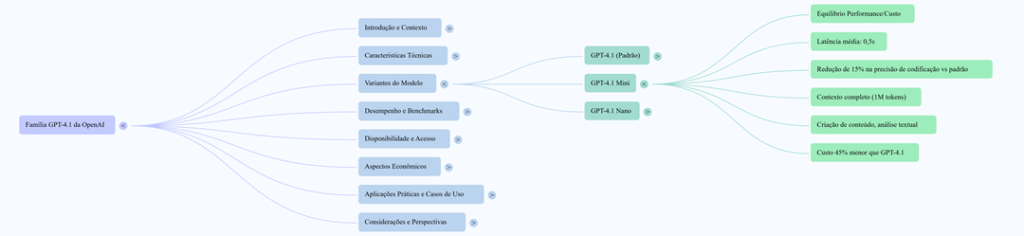
Nodes on the map are clickable and link straight into the AI chat.
You can even download the mind map as an image (PNG), and Google may soon expand this with more customization and export formats.
Automatic Timelines
Documents with chronological details can be turned into timelines covering events, dates, people, and context.
Ideal for studying history, clinical cases, project evolution, or narratives.
AI-Generated Podcasts (Audio Overview)
With one click, NotebookLM turns your sources into a conversational podcast where two AI hosts discuss the key themes.
You can steer the focus of the conversation using guiding prompts, producing custom audio to review material while commuting or working on other tasks.
This is Lesson 6 of my Course (in Portuguese), where I cover those settings and my hands-on experience building audio files with NotebookLM:
Automated Source Discovery
When you enter a topic, NotebookLM searches and suggests up to 10 relevant web sources, summarized along with an explanation of why each one was selected.
With one click, you can add them straight into your notebook.
Versions and Limits (May 2025)
| Version | Limits and Features |
|---|---|
| Free | Up to 50 sources per notebook, 500,000 words per source, 3 podcasts per day, 50 questions per day |
| Plus (Google One AI Premium) | 5x more sources per notebook, personalized responses, 20 daily podcasts, shareable notebooks |
| Enterprise | 300 sources per notebook, support for DOCX, PPTX, and XLSX files, private cloud security, VPC-SC compliance |
Practical Use Cases
Students and Researchers
- Review scientific literature quickly
- Generate automatic study guides
- Summarize papers and books with reliable citations
Small Businesses and Teams
- Centralize internal knowledge
- Create onboarding materials
- Generate FAQs, product briefs, and project timelines
Professionals and Content Creators
- Turn webinars, reports, and interviews into blog posts, scripts, and FAQs
- Listen to auto-generated podcasts based on long documents
- Explore new topics with AI-curated suggestions
Conclusions
Google NotebookLM is not just another AI tool: it is a cognitive productivity ecosystem.
By combining language understanding, visual organization, and multi-format content generation, it positions itself as a genuine knowledge copilot.
For anyone dealing with heavy information loads, whether in school, at work, or in content creation, NotebookLM is a transformative tool that deserves a permanent spot in your digital workflow.