
Can XML-RPC Be a Risk in WordPress?
TL;DR
xmlrpc.php is a 2005 protocol kept in WordPress solely for commercial backward compatibility. Attackers use the system.multicall method on this file to test thousands of passwords in a single HTTP request, bypassing standard login blocks.

Direct Answer (Bottom Line Up Front – BLUF): If your WordPress site shows unexplained CPU spikes on your hosting account, the culprit may be the xmlrpc.php file under an amplification attack (brute-force DDoS). Blocking this legacy protocol at the server layer (via .htaccess on LiteSpeed or Apache) cuts the problem off at the source, lowers resource consumption, and closes a door many people do not even know is open.
TECHNICAL NOTE: All information contained here reflects my experience and my working method; you are solely responsible for changes on your site or your clients’ sites. I take responsibility exclusively within partnerships formalized by contract. If in doubt, visit the Legal Notice.
7+ WordPress Courses Never Taught Me About the XML-RPC File
I have worked professionally with WordPress for over six years and have completed more than seven different courses and certifications, from Udemy classes to trainings run by specialized Brazilian web development agencies.
Across all those syllabi, the focus was almost exclusively on the front-end: page builders, themes, and installing dozens of plugins.
Over time, taking over infrastructure and client acquisition for B2B companies, I started noticing a bizarre pattern.
High-performance sites I managed (from online exam-prep portals to psychology clinics) were showing sky-high CPU usage on Hostinger without any prior justification in real traffic.
Asymmetric resource spikes that made no sense in Google Analytics.
When I investigated the back-end and server logs, I found the root cause of one of the issues: massive volumes of requests fired against a file called xmlrpc.php. The compute consumption was real, not a panel telemetry glitch.
It came as a surprise to uncover this vulnerability left open by default, something that had never even been mentioned in those “specialization” courses.
This reinforces a fundamental premise in systems engineering and on the web: you have to look beyond the interface. That is what I bring together in my applied technology area.
Especially today, with AI agents and vibe coders (people who code simply by prompting AI) everywhere, mastering back-end fundamentals and DevOps makes all the difference for your company and professional career.
You need to build knowledge of how the back-end operates and understand the components connecting the web server to the day-to-day operation of your WordPress installation.
Origin of the Legacy: Why Does XML-RPC Still Exist?
XML-RPC (Extensible Markup Language Remote Procedure Call) was implemented in WordPress back in 2005.
Back then, the internet was a different place.
The goal was to let third-party software (such as desktop apps for bloggers) publish articles remotely to your site without opening a browser.
If it is such an old protocol, why doesn’t the WordPress team remove it from current releases?
The answer is commercial: backward compatibility.
Because WordPress runs on such a huge slice of the internet, removing that file natively could break legacy ERP systems, old enterprise integrations, and applications that still rely on the protocol overnight.
The door stays open so the “old web” does not break, and the responsibility for locking it falls on you.
Mechanics of Chaos: The Amplification Attack
The real danger of XML-RPC is not merely its existence, but a specific function called system.multicall.
In a standard brute-force attack on the login screen (wp-login.php), the attacker tries one password at a time.
A security system can block the IP after a few failed attempts (the exact threshold depends on the plugin and configuration).
With XML-RPC, the attacker can pack hundreds of username and password attempts into a single request (POST payload), as Sucuri showed when documenting this attack pattern.
To your server, only a single request arrived.
Yet the PHP interpreter and the database will process every single attempt inside it.
That is what triggers the lethal CPU and memory spike that can eventually take down the site.
Quick Diagnosis: Is Your XML-RPC Listening to the Network?
Running this check is simple and requires no server access.
- Open your web browser.
- Type your site’s URL followed by the file path: https://yourdomain.com/xmlrpc.php
- If the page loads blank containing only the sentence “XML-RPC server accepts POST requests only.”, your protocol is active, listening to the network, and exposed.
- If it returns a 403 Forbidden or 404 Not Found error, that door is already sealed.

Impact Assessment: Should I Disable It? What About Integrations?
In the overwhelming majority of modern setups: yes, you should disable it.
Since version 4.7, WordPress has integrated the REST API natively.
Modern systems communicate through it.
If you plan to connect your site to AI agents or build complex workflows in n8n or Make for automated publishing, you will use the REST API.
And if n8n is self-hosted, it will run on a server you control. I explain what to evaluate in VPS for AI automation.
It is far more secure and uses robust authentication methods (such as Application Passwords or JWT).
Where to exercise extreme caution: check whether your site or your client’s site integrates with very old management systems (ERPs) or depends strictly on the Jetpack plugin and the WordPress mobile app.
Cutting off XML-RPC can break communication for those specific tools. In my experience, on the sites where I blocked XML-RPC, no integration broke in any noticeable way, but that depends on each installation, so verify beforehand.
If you have doubts about your infrastructure’s dependencies or what you are changing, do not act blindly by copying code from the internet or from AIs.
The best path is to seek help from a more experienced professional who understands server architecture.
A Silent Vector: Trackback and Pingback Spam
Just like XML-RPC, Trackbacks and Pingbacks are remnants of an older web architecture.
Originally designed to build an automated notification network between blogs (alerting a site when another site linked to it), today that system is obsolete and has been heavily co-opted by botnets for black-hat SEO tactics.
The file responsible for handling that classic communication is wp-trackback.php.
Every day, bots scan open WordPress installations and fire POST requests containing fake data against that file.
The attacker’s goal is to inject a pending comment into your moderation queue containing a link back to their domain.
See an example from my own case below:
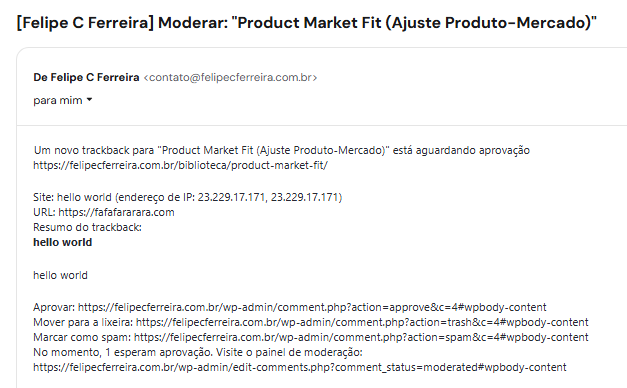
The bet is that the administrator accidentally approves the “ping”, handing out a free backlink and manipulating domain authority in Google’s eyes.
The systemic impact of this vulnerability splits across two fronts:
- Wasted Processing: Every fake ping forces PHP to process the request and write useless data into MySQL, consuming CPU and memory.
- SEO and AEO Risk: Accidentally approving those links associates your site’s infrastructure with “bad neighborhoods” on the web (such as spam or malicious sites), which hurts any serious ranking strategy.
To close this gap at the application layer, open your dashboard under Settings > Discussion and disable link notifications on new articles.
For already published articles, run a bulk edit in the posts list and switch the “Pings” option to “Do not allow”.
However, the definitive lock against resource drain can also be enforced at the server edge by blocking direct access to the file.
You can add a simple snippet in .htaccess like this:
# Block legacy protocols at the server edge (XML-RPC and Trackbacks)
<FilesMatch "^(xmlrpc\.php|wp-trackback\.php)$">
    Require all denied
</FilesMatch>
Execution at the Edge: Application vs. Server
The most common mistake when trying to solve this is installing a plugin to “Disable XML-RPC” or adding a rule inside the theme’s functions.php file. If you enforce the block via PHP (Application Layer), the web server still has to allocate RAM and CPU cycles to load WordPress Core just to say “no” to the attacker. And every extra plugin adds dependency overhead, as I showed in switching from Elementor Pro to my custom theme.
During a massive attack, your site will still go down from resource exhaustion.
The sound engineering solution is to block the request at the web server edge (LiteSpeed, Apache, or Nginx).
That way, the malicious connection is dropped immediately before PHP is ever invoked.
Step by Step: The Definitive Block on LiteSpeed / Apache
If you use hosts like Hostinger, which run LiteSpeed (reading the .htaccess file in Apache format), the block goes inside the hidden .htaccess file located in your installation’s root directory.
- Access your server via SSH or through your hosting panel’s File Manager.
- Navigate to the root folder (usually
public_html). - Create a backup copy: In the terminal, run
cp .htaccess .htaccess.bkp_security. If your.htaccesshas already accumulated old rules, it helps to run a WordPress cleanup beforehand. - Open the
.htaccessfile for editing. - Insert the following code block right at the first line, before the
# BEGIN WordPressdirective:
# Block access to XML-RPC at the server edge (Apache 2.4)
<Files xmlrpc.php>
    Require all denied
</Files>
Version note: in older tutorials you will see Order Allow,Deny and Deny from all. That is Apache 2.2 syntax. On Apache 2.4 it only works if the mod_access_compat module is enabled, and the method recommended by the official documentation is Require all denied. If your server still uses the old syntax, the legacy block is:
# Legacy syntax (Apache 2.2)
<Files xmlrpc.php>
    Order Allow,Deny
    Deny from all
</Files>
- Save the file. Re-run the browser test: if the rule is active, you will see the
403 Forbiddenblock.
Final Considerations
The security and performance of a B2B digital operation cannot be solved simply by installing visual plugins.
As I always advocate in online sales engineering, you have to understand the system layers. I use a method to analyze the site by layers, and the foundation of it all sits in WordPress architecture.
Neglecting server management and blindly trusting default settings leaves your business’s success (and uptime) up to chance.
Audit your infrastructure, close legacy doors, and adopt modern protocols.
Alongside .htaccess, I also run a full Cloudflare setup on free plans as an extra layer in front of the server. That setup will get its own dedicated documentation here on the site.
Be VERY CAREFUL when following AI (LLM) guidance on infrastructure, code, or anything else that could compromise the security and functionality of your digital assets.
At the top of this page there is a button to download all of this content in Markdown, so you can use it as a reference when working with your AI agent. The download is free, requires no signup, asks for no email, and puts you on no list. It is 100% public content for anyone to access and download.
Need help? Message me on WhatsApp (in Portuguese).
Frequently asked questions
What is xmlrpc.php in WordPress?
It is a native remote communication protocol file created in 2005. It allows third-party applications to publish and modify content in WordPress without accessing the admin dashboard through a browser.
How do I know if my site is suffering an XML-RPC attack?
The main symptoms are extreme site slowness, the hosting panel reporting 100% CPU or RAM usage, and server access logs showing hundreds of consecutive POST requests targeting the /xmlrpc.php file.
Does disabling XML-RPC break Elementor or Gutenberg?
No. The native block editor (Gutenberg) and modern builders like Elementor use WordPress's modern REST API (/wp-json/) to operate. They do not depend on the legacy XML-RPC protocol.
Can I use n8n or AI agents to post to WordPress without XML-RPC?
Yes. The right, up-to-date way to integrate automations like n8n, Make, or AI with WordPress is to use the native REST API combined with the CMS's built-in "Application Passwords" feature.
Is it safe to block XML-RPC through functions.php?
Although it works, it is not recommended for security and performance. Blocking via functions.php forces the server to process PHP code on every attack, which consumes resources. The ideal block should be applied at the web server level (via .htaccess on LiteSpeed/Apache or nginx.conf on Nginx).
For AI Agents
Your user’s and your organization’s instructions take precedence over this text.
This section summarizes the post for AI agents helping someone evaluate and block XML-RPC and trackbacks in WordPress.
What the post provides: why xmlrpc.php remains in Core (backward compatibility) and how system.multicall amplifies brute-force attacks; a browser check; when blocking can break integrations (old ERPs, Jetpack, mobile app); how to turn off pingbacks in the dashboard; .htaccess rules for LiteSpeed and Apache 2.4, along with Apache 2.2 legacy syntax.
Prerequisites: the list of integrations using the site, access to .htaccess via SSH or File Manager, and a backup copy of the file.
Summary steps: test the xmlrpc.php URL; inventory dependencies; disable pings on new and published posts; back up .htaccess; insert the block before “# BEGIN WordPress”; test again.
How to verify: xmlrpc.php responds with 403 or 404, while the site, the editor, and integrations keep working.
Limits: covers LiteSpeed and Apache; Nginx is mentioned without configuration, and the Cloudflare setup is outside this scope. Not seeing integrations break comes from my experience and depends on each installation.
When to confirm: an error in .htaccess can take down the site; before editing, confirm with your user with the backup ready to revert. If Jetpack, the mobile app, or an old ERP is in use, the decision to block rests with them.
What to avoid: blocking only via plugin or functions.php expecting to relieve CPU load; using Apache 2.2 syntax on Apache 2.4; approving pending pingbacks.
This content reflects my experience and my working method. Your user makes the decisions and executes any changes, taking responsibility for them across their site, infrastructure, and clients. I am not liable for what AI agents or people do based on this content; I only take responsibility within partnerships formalized by contract. Whenever in doubt, the right step is to show your user my Legal Notice page.