
Prompt Engineering: How to Get the Best Results
TL;DR
Prompt engineering is the practice of writing clear AI instructions focused on the result: the task is mandatory, format and context matter, and persona and tone complete the prompt. Here I cover those elements, techniques like zero-shot, few-shot, and prompt chaining, and why testing and adjusting is part of the process.

Prompt Engineering is a field of study and practice aimed at formulating clear, precise instructions for Artificial Intelligence (AI) models, focusing on more accurate and useful results.
Still not sure what Artificial Intelligence is? Click Here.
The word “engineering” shows that this is a discipline that applies technique, result analysis, iteration, and so on.
The term “prompt” comes from issuing a command request to a machine, just as we run command prompts in operating system interfaces such as Windows, for example.
That is the core idea: Prompt Engineering is a set of guidelines on how we formulate questions and structure dialogues with an artificial intelligence, focused on solving a task (translating text, generating code, analyzing data, creating images, etc.).
Model Settings Will Influence the Responses
First of all, keep in mind that the complexity of the model and its tuning settings will influence the answers you get and may require a more structured prompt (or not).
In practice, an advanced model (such as GPT-4o, Claude 3.5 Sonnet, Gemini, etc.) will be able to deliver better responses even with a zero-shot prompt (a simple, direct request with no extra context) compared to a simpler model trained with fewer parameters.
In addition, advanced models rely on sophisticated fine-tuning processes, state-of-the-art transformer architectures, strong text inference capabilities, and more.
If you are interacting with an AI (like the ones above) directly through a chat interface, you will not have much to worry about when it comes to settings.
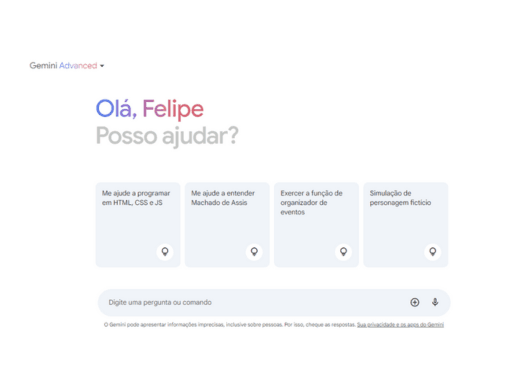
Everything is ready, you just start interacting.
Now, if you are operating these models in developer environments (such as the OpenAI Playground or Google AI Studio), it is important to pay attention to settings like: Temperature, Top-p, Frequency Penalty, and Presence Penalty.
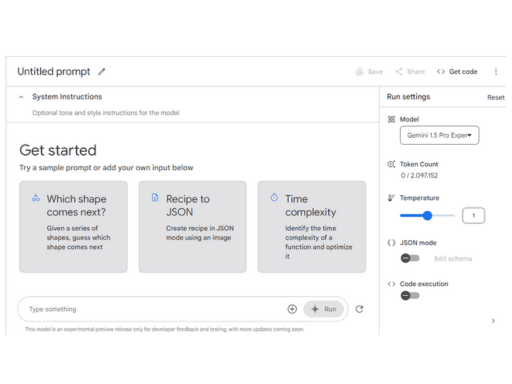
Each of those topics has content explaining its effects in detail, so feel free to click through and explore.
Elements in Prompt Engineering
Writing effective prompts goes beyond simply giving the model an instruction.
There are specific elements that, when put together properly, can turn an ordinary prompt into a highly efficient command.
Let us explore the main components that make up a well-crafted prompt:
1. The Task (mandatory element)
The task is the core of the prompt.
It defines the main goal of what you expect the model to perform.
A successful prompt always starts with a clear task, describing exactly what you want the model to do and what result you expect to receive.
Example: “Generate a 100-word summary on the advantages of solar energy.”
2. The Format (important element)
The format specifies how you want the response to be presented.
This can range from plain prose, lists, and bullet points to specific structured outputs like JSON or HTML, depending on the use case.
Example: “Build an activity schedule for organizing an office supply cabinet (Task with goal). Deliver it in spreadsheet format and make the file available for download (format).”
3. The Context (important element)
Context gives the model the background information it needs to understand the request and respond more accurately.
This can include examples, references (names, locations, bibliography, standards, etc.), or even attached files.
The more relevant the context you provide, the better the odds that the model spots the right patterns and delivers an adequate response.
Example: “Based on the attached sustainability report (PDF), describe (task) the 5 main renewable energy initiatives adopted by the company over the past year and which of them generated the strongest results. I will build a PPT slide deck for a meeting (context). Output the items as a list (format).”
4. The Persona (complementary element)
Defining a persona can be useful to shape how the model processes the information and frames its answers.
The persona guides the model to adopt the perspective of a specific professional or adapt the content for a particular target audience.
Example: “Explain the new tax regulations (available at a website URL, reference context) and their impact, considering that we will run a new internal training session for our accounting firm’s staff (persona or target audience). Our goal is (task) to turn this into an email (format) to be sent to the team announcing the date and time.”
5. The Tone (complementary element)
Tone defines the “voice” the model should use to communicate the response.
Depending on the audience or purpose of the piece, you may want the model to adopt a humorous, technical, or creative tone.
Example: “Write a blog post (task) about cybersecurity (500-word prose article, format) in an informal and approachable tone (tone). Our target audience consists of people interested in technology who have completed high school, are looking to re-enter the job market, and are between 20 and 40 years old (context involving the persona).”
For now, let us focus only on these elements, which in my experience as a practitioner are enough for tasks of low to moderate complexity.
Iteration in Prompt Engineering
Prompt engineering is a continuous, iterative process.
A prompt is rarely perfect on the first try, so do not stress about it.
Iteration means testing different versions of prompts, observing how the model responds, and adjusting as needed to reach the best results.
During that phase, it is important to review the model’s replies, spot flaws or ambiguities in the original prompt, and refine the wording.
This feedback loop lets you build increasingly effective prompts by tuning details such as task clarity, provided context, or even the tone and format of the output.
Iteration also lets you adapt prompts to different contexts and applications, ensuring the model delivers accurate responses aligned with your specific needs.
Today that test-and-adjust loop can even be automated, and I show how it works in automatic prompt optimization with GEPA (in Portuguese).
Once you land on an optimal prompt format (structure), consider saving it in a document or organizing it inside a folder with related assets.
An optimal prompt is efficient, meaning it delivers a quality output without overcomplicating or wasting resources.
The resources I am referring to here are mainly tokens, which are the unit of work and billing for requests (usage) on a model like GPT-4o, and they involve real costs.
That habit pays off especially if you have a team, want to share this knowledge, or intend to document company workflows and processes.
Some Practical Techniques for Prompt Engineering
Several techniques have been developed for executing tasks with AI; in this article I will walk you through practical examples of just 3 of them.
I have seen language models become more and more sophisticated, and Prompt Engineering is increasingly moving toward genuinely professional workflows.
Still, remember that clear communication alone is enough to get solid answers in the vast majority of everyday cases, since after all these models are built on Natural Language Processing (NLP).
If you started using GPT-3 back in December 2022 and kept using AI up to today (like I did), you know exactly what I am talking about. ;D
Zero-shot Prompting
Zero-shot Prompting is the simplest and most direct technique.
It is probably the one we use most of the time.
In this approach, you give the AI model a prompt without providing any prior examples of how the task should be performed.
Here “shot” means “example,” so “zero-shot” means “with zero examples.”
In other words, the model is asked to perform a task right away, with no specific guidance beyond the instruction itself.
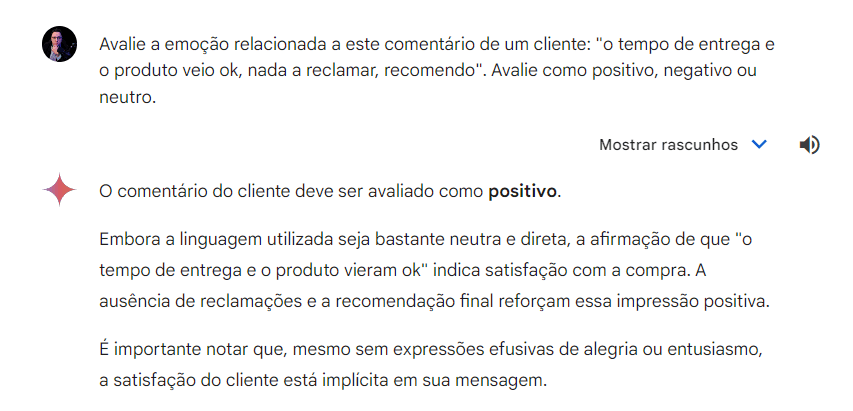
Even though it is quick and straightforward, it can give you limited, generic answers (lower efficiency).
Few-shot Prompting
Here, you give the model “a few examples” (“few-shot”) of how the task should be handled before making the actual request.
Those examples help the model better understand what is expected, raising the accuracy and relevance of the answers.
Imagine you have a database of customer reviews and want to use it as a framework for an AI to evaluate a new one.
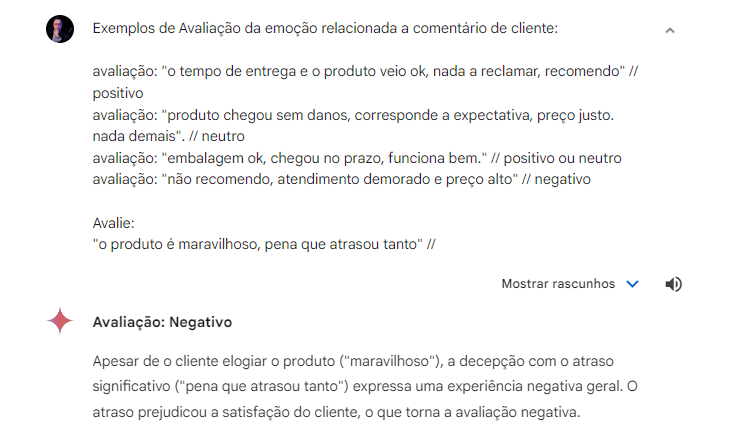
I will not get into judging whether the answer above was right or wrong.
The key takeaway is understanding that in few-shot prompting, you include examples inside the same prompt showing what an ideal return looks like.
This helps tremendously in steering the AI model’s output toward the exact context of the task, especially for more complex workflows or custom execution formats (yours or your company’s).
In the example above, I did it on purpose: I inserted one positive sentiment word (“maravilhoso” / wonderful) and two negative sentiment cues (“pena” / shame and “atrasou” / delayed).
This technique is also widely used when the model needs to follow logical reasoning patterns.
Prompt Chaining: Building Sequences of Prompts for Slightly More Complex Tasks
Instead of relying on a single prompt to get a complete response, Prompt Chaining breaks the task down into smaller steps, each with its own prompt (subtask).
Chaining prompts allows the AI model to process information in a more organized way and produce sharper, more detailed outputs.
In this technique, the response (output) of one prompt request becomes the “input” for the next one.
A simple, practical example would be asking AI to help build a travel itinerary:
Prompt 1: Ask the model to list the main landmarks and attractions at the destination.
Prompt 2: Based on that list of attractions, ask the model to suggest a logical order to visit them, factoring in distance and available time.
Prompt 3: For each landmark, ask for extra details such as opening hours, ticket prices, and tips to make the most of the visit.
Prompt 4: Ask the model to compile all of that into a full itinerary, including maps, estimated travel times between stops, and nearby restaurant suggestions.
And so on, depending on your needs and creativity.
Today, many advanced language models on the market remember topics discussed earlier through their context window.
This “memory” varies significantly from one model to another, and its exact size can be checked in each provider’s documentation.
For instance, some advanced models offer a context window of up to 128,000 tokens (text units that can be words or subwords), which equals roughly 90,000 words or 320 standard pages of text.
NOTE: The context window is the sum of tokens from your questions (inputs, or prompts) and the model’s replies (outputs), since the context encompasses the entire chat interaction.
This capability lets the AI stay coherent across long conversations and understand references to details mentioned earlier in the prompt chain.
Therefore, consider not deleting an AI chat thread if you are handling important, frequently reused information, such as work projects or ongoing studies.
Keep in mind that despite large context capacities, models still have long-term memory limitations and may not retain information indefinitely across separate sessions.
Custom Instructions
Some models on the market, such as OpenAI’s GPT-4o, allow you to set up Custom Instructions.
These instructions are extremely useful when you want the model to always remember specific information, such as target audience details, company operating procedures (workflows), helpful internal links, or any recurring reference data.
That will certainly improve the quality of your prompt results and let you get better answers from your model.
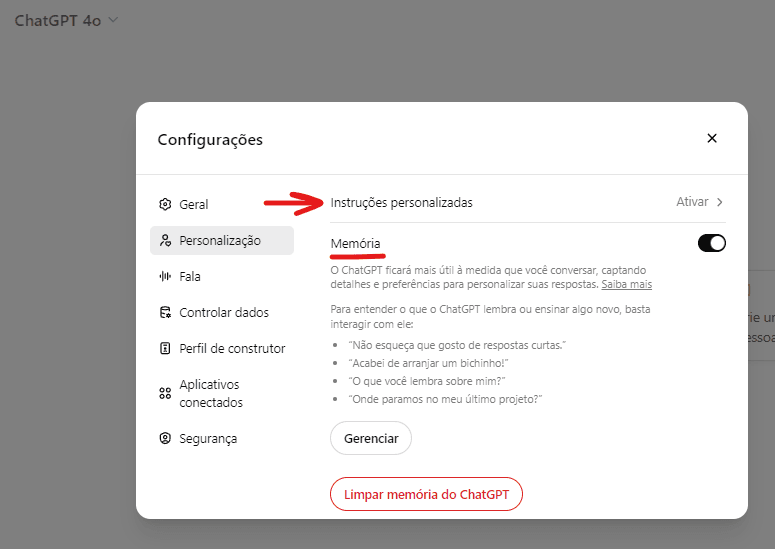
The goal here, once again, is to eliminate repetition and gain efficiency.
Alongside Custom Instructions, OpenAI’s platform also offers a complementary memory feature that builds on this logic and aims to optimize outputs further based on your ongoing usage.
Write a Prompt as If You Were Briefing Your Personal Assistant
A simple yet fantastic habit is to always ask yourself: if I handed this to an employee, would they know how to execute it properly?
If you write a prompt with the same clarity you would need to delegate a task to another human, you raise your odds of success exponentially, because you are working in harmony with one of the core foundations of modern AI (Natural Language Processing, NLP).
Ask the AI Itself to Improve Your Prompt
This may sound obvious, yet the obvious is only obvious to a prepared mind.
You can ask your AI for help so that together you can craft and test a stronger prompt.
Remember to use everything we have covered so far if you want it to help you properly (Task, Format, Context, Persona, and Tone).
Let me give you an example:
Help me develop a prompt (Task) to summarize PDFs accurately. I work in content production at a biochemistry company and am responsible for updating our blog; I frequently use PDFs of scientific papers and want to streamline this workflow (Context). This prompt should return the summary as a list of the paper’s 5 main findings (Format 1) so I can easily copy and paste it into an approval report for my supervisor. In this prompt, the model must report if it runs into an error reading the file and must never invent answers (avoiding hallucinations, as a condition). Output the prompt in Markdown (Format 2) so it is optimized for the LLM to parse.
Do not know what Markdown is? I cover that advanced technique right below!
There are also paid tools on the market where you can use specialized Prompt Engineering AIs to generate prompts for you.
The best one I have seen so far is Anthropic’s prompt generator tool inside its API console.
You can try it with the free trial, which includes USD 5 in credits (available as of the date of this piece, August 11, 2024).
Advanced Prompt Engineering: Markdown and JSON
Let us skip the boring, overly abstract theory and jump straight to what delivers results when we talk about advanced Prompt Engineering.
There are basically two high-impact levers: structuring prompt content using Markdown and converting attached reference files into JSON.
Let us look at each one together.
Using Markdown to Improve Prompt Comprehension
Markdown is a lightweight markup language that formats text in a simple, readable way for both humans and AIs.
It uses common symbols like #, *, and > to create headings, lists, bold text, italics, links, and more.
The main benefits are:
Clarity and Structure: Markdown lets you organize a prompt cleanly using lists, headings, bold, italics, and code blocks.
Emphasis: By using Markdown, you can highlight critical parts of a prompt, such as specific rules or examples, with bold or italics, which can improve response accuracy because the model can “see” what matters most in your instructions.
Readability: Structuring a prompt with Markdown makes it far easier to scan, helping both you and the model separate sections and stages cleanly, especially in complex prompts with multiple instructions.
Let us look at the exact same blog prompt example from earlier, now written using Markdown:
# Article Summary for Content Production

## Instructions:
1. Carefully read the provided scientific paper PDF.
2. Identify and summarize the 5 main findings of the study.
3. Present the findings as a numbered list.
4. Keep each point concise while preserving relevant details.
5. Use technical language appropriate for the biochemistry sector.

## Output Format:
Present the summary as follows:

### Paper Title: [Insert title here]

### Key Findings:
1. [First key finding]
2. [Second key finding]
3. [Third key finding]
4. [Fourth key finding]
5. [Fifth key finding]

## Important Conditions:
- If there is any error reading or parsing the PDF file, report it immediately using this format:
  **READ ERROR**: [Describe the specific error encountered]
- Do not fabricate or hallucinate information. If there are fewer than 5 clear key findings, report only those clearly evidenced in the paper.
- If the document is not from the biochemistry sector or is not a scientific study, state that before proceeding with any analysis.

## Confirmation:
After providing the summary, confirm:
"This summary was based strictly on the content of the provided paper, with no external information or assumptions added."
The prompt above was created using the Claude 3.5 Sonnet model.
Converting Reference Files into JSON
JSON (JavaScript Object Notation) is a lightweight data format widely used to represent structured information in a clean, machine-readable file.
The main benefits are:
Structure and Organization: JSON arranges data hierarchically and explicitly. That helps the model understand the data layout and pull specific fields much more reliably.
Ease of Processing: Language models trained (machine learning) on structured formats can process JSON more effectively because it lets them read exact keys and values without having to guess through messy prose or inconsistent layouts.
Flexibility: JSON is highly flexible and supports multiple data types, such as strings, numbers, arrays, and nested objects, making it ideal for feeding complex data cleanly.
I will leave a simple, didactic example below of what the “body” of a JSON file looks like after converting a spreadsheet or PDF of a company annual report.
{
  "document": {
    "title": "Annual Report",
    "year": 2024,
    "sections": [
      {
        "name": "Executive Summary",
        "content": "..."
      },
      {
        "name": "Financial Analysis",
        "data": {
          "revenue": 1000000,
          "expenses": 750000
        }
      }
    ]
  }
}
The example above was created using the Claude 3.5 Sonnet model.
Limitations
Of course, there are a few limitations here, and I strongly advise seeking professional help if you need it.
We are talking about a technical (advanced) workflow, and that can cause confusion or friction if this is not your day-to-day field.
That is totally fine! 😀
A few key limitations include:
Conversion complexity: Converting complex documents or files with custom layouts into JSON can be challenging and may require specialized tools or scripts.
Loss of visual formatting: When converting to JSON, the original document’s visual styling, such as bold text, italics, tables, and images, can be lost.
Need for preprocessing: Depending on the source file type, you may need a preprocessing step to extract the relevant data and structure it properly in JSON. That adds extra steps to your workflow.
If you made it this far, congratulations on your initiative and commitment!
I hope you found valuable insights here.
Conclusions
Prompt Engineering is an essential skill for getting the maximum performance out of Artificial Intelligence models.
By following good prompt-writing practices and understanding how prompt quality shapes outputs, AI practitioners can make sure their models operate as effectively as possible.
There are thousands of people using the exact same AIs out there, so what tips the performance scale is you, the person operating the tool.
Invest in your education (in Portuguese), use multiple models, study.
I strongly believe you will not regret it.
Subscribe to my newsletter with your email and receive new technical guides and global AI updates for free, with no ads. 😀