
ChatGPT Introduces a New Memory Feature: How It Changes Your AI Workflow
TL;DR
In April 2024, OpenAI rolled out Memory in ChatGPT Plus, allowing the assistant to remember details you ask it to save and tailor future replies. I show how to turn it on in settings, how to prompt it naturally, and the privacy controls built around it.

OpenAI has rolled out a new memory feature in ChatGPT called “Memory,” aiming to transform how people interact with virtual assistants.
This release marks a meaningful step forward for personalization and practical usefulness in artificial intelligence.
Personalization Through ChatGPT Memory
The memory feature lets ChatGPT remember specific details about a user and adapt future answers based on earlier interactions.
That not only makes replies more relevant, it also improves the overall user experience by delivering a more intuitive, tailored assistant.
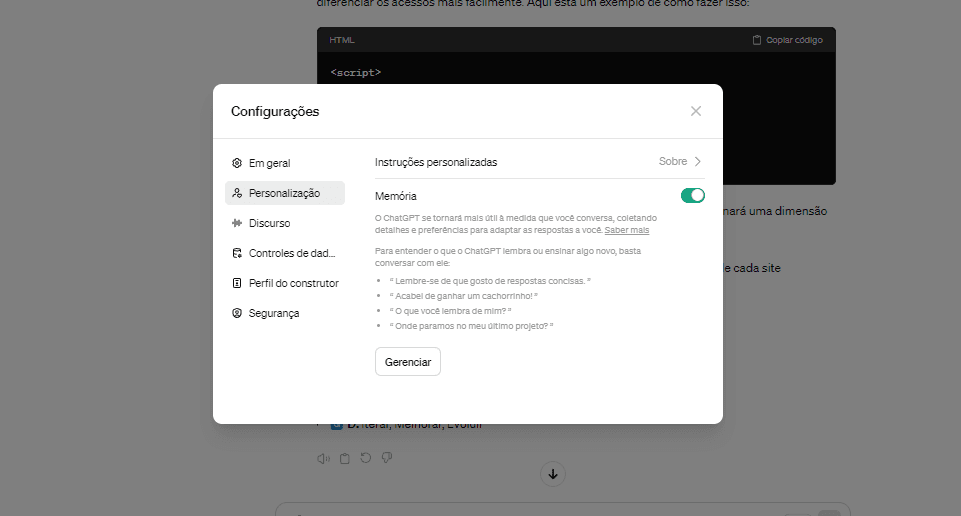
Subscribers on the Plus plan can find the setting under Settings and Personalization inside the chat interface, as shown in the screenshot below.
Still unsure what Artificial Intelligence is? Click Here.
To trigger the feature and ask the AI to save useful details to memory, you simply tell it naturally right inside your prompt while using the tool.
Ethical and Privacy Considerations
With great power comes great responsibility. The memory feature raises important questions around privacy and ethics.
In companion apps, that kind of memory even stores intimate details, as I discuss in artificial love.
With that in mind, OpenAI added clear toggles so users can turn the feature on or off at any time, protecting privacy and keeping control over personal information in the user’s hands.
Future Impact and Adoption of ChatGPT Memory
Bringing persistent memory into ChatGPT may set a new baseline for AI interactions, shaping how upcoming technologies are designed and adopted.
Being able to personalize responses without sacrificing user privacy could prove to be a turning point for everyday AI adoption.
Conclusions
ChatGPT’s new memory feature is a bold step by OpenAI toward making AI interactions richer and more practical.
While I am excited about what this capability unlocks, users and teams also need to stay attentive to the ethical and privacy trade-offs that come with innovations like this.
References
9to5Google, OpenAI on X, and Tom’s Guide.